Kindle
// September 5th, 2010 // General, p.u.c & p.u-uk.org
It was my birthday on Monday, and on Friday I finally received my present, Sara, Lemon and my parents had bought me, a Kindle 3G. I’ve been using it for a few hours (finished reading Bram Stokers’ Dracula this morning) and I’m pretty impressed. I’ve not had or even played with an ebook reader before.
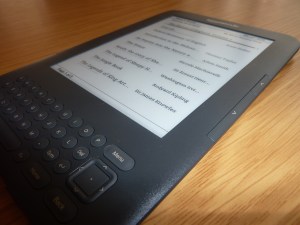
The stand out thing is the screen, it just doesn’t look real, more like those fake screens that are sometimes on display handsets in mobile phone shops. I have sat and tried to read an ebook at my computer before, staring at a bright light at an uncomfortable desk or contorting my self trying to lay down and read from a laptop gave me both neck ache and made my eyes not feel quite right. In contrast I have quite happily sat and read on the Kindle for hours, just as I could a paper book. The display isn’t lit, the contrast is perfect, it works by some kind of magic.
So far I’ve preferred holding the Kindle in two hands in landscape mode to read, one hand to hold and another to keep pushing the next page button. It seems very comfortable and not too heavy. I usually read whilst laying down alternating between laying the book down and holding it with one and to read the opposite page. The Kindle supports this posture very well too, though you don’t need to keep moving to read the opposite page or struggling to keep the book whilst holding it down with one hand.
The shop integration works well, it’s pretty fast over wifi or if you’re somewhere with a decent 3g signal. You have the usual “amazon reccomends” and bestsellers lists, as well as being able to drill-down through hundreds of thousands of books sorted by genre. Once you’ve found a book you like you click buy and it’s downloaded and ready to read within seconds. Instant gratification. I’ve downloaded several free out of copyright books through it, to buy books you have to set-up a card for one-click ordering, I imagine it may prove expensive! Combined with Project Gutenbug this may prove the beginning of the end for penguin classics.
Another big reason for getting the Kindle is the free 3g access and the built in web browser, which is surprisingly capable, it does javascript and cookies but not java or flash. Even javascript heavy pages such as Facebook loads and seems to work reasonably well. Gmail fails to work at all though with a message saying “Web Browser is unable to display this web page”, which is a shame as that could have been handy in a pinch. The web browser is mainly intended for reading text heavy pages such as wikipedia. The browser’s article mode tries to reflow the main page text and hide the frills to make it more book-like to read, this works really well for wikipedia,. In some ways reading specific articles on wikipedia using the Kindle article mode is more pleasurable than using my desktop, the browser is not best suited for those rambling wikipedia browses where you end up with dozens of tabs open though.
XKCD is right, the browser and wikipedia does turn it into the hitch hikers guide to the galaxy. It’s a slight shame the text to speech function doesn’t work on the web just to round the effect off.
I think the kindle is going to change my life in a few ways, I’ll probably read more now I can read project gutenburg books in a sane way. To Sara’s happiness, the big cupboard full of books will probably stop expanding. Also to Sara’s happiness, our suitcases won’t be full of books whenever we go on holiday, I’m not one to spend a whole week sat at the side of a pool reading for a whole week but I usually finish two or three books while in the airport and flying as well as the time I spend reading during any downtime.
[Update]
One downside is the way books are organised, currently they are organised by collections (tags), however you have to enter all of this metadata yourself, and enter it on the Kindle. It would be nice if Amazon marked-up their ebooks into collections, so downloading “Rendezvous with Rama” straight to the kindle would automatically create and ‘fiction’ and ‘scifi’ collections and add the book into them. Also for ebooks I transfer over usb to use the directory name for the collections it should be in. So NonFiction/Travel/foo would be in the NonFiction and Travel collections.
It would also be nice to have a ‘read’ and ‘unread’ collection that the Kindle populated automatically.


Did you try the twitter app? Just wondering how that looked…
The twitter feature basically lets you highlight a bit of text in a book then post it to your twitter account. Like so: http://twitter.com/dsas/status/23095277548
I’m holing out for a Sony PRS-650 myself: same screen as the Kindle 3 (e-ink pearl), touch capable, supports the standard ePub format, aluminum body and you can manage it, along with your e-book collection, using Calibre (apt-get install calibre). The downsides are a higher price and no ‘free’ 3G.
Plus, Amazon’s approach to lacing books with DRM (check how many devices you can ‘activate’ your purchased books on), not supporting any format besides their own mobipocket, charging for public domain Kindle edition books outside the US…. just rubs me the wrong way.
And “the beginning of the end for penguin classics”? I disagree, they bring a lot more to the table besides the barebones text you can pull off Gutenberg, like contextualizing notes throughout the text and some pretty good typography to boot.
TdS,
The handy thing about calibre is that it can convert files so that they’re readable on the Kindle. Not supporting ebook natively isn’t great, but it also supports pdf, txt and Mobi.
I’m based in the UK and have downloaded public domain Kindle edition books for free. I’m guessing it’s for markets where they don’t have a local 3G deal yet. You always download the public domain texts from Project Gutenburg anyway..
You’re right, the DRM isn’t ideal, but far as I’m awareis unavoidable, please let me know of any mainstream stores that don’t use it. As far as I’m aware most Amazon ebooks can be downloaded to six different devices at once, which is fine to me. The only problem is if I ever want to switch devices. The DRM has been broken…
The typography on the Kindle for even .txt files seems mostly indistinguishable in my limited experience.
Enjoy the Sony though, if it uses the same screen as the Kindle you won’t be disappointed.
Download calibre (http://calibre-ebook.com) let it do a lookup and fill in all the details, syncs with reader etc etc
Thanks Steve, I installed Calibre from the Ubuntu repositories already. I’ve yet to play with it properly though, the Kindle being delivered distracted me. I’ll give it another try this week.
If you’ve installed Calibre from the repositories, you should know that it’s too old to support the Kindle 3. You can either download the latest version directly from the Calibre website, or make a simple single-file change to allow the repository version to work with the Kindle 3:
http://www.peppertop.com/blog/?p=1054
Thanks for the tip
The thing about DRM is that once you agree to support companies which make use of it (e.g. purchasing books from the Kindle store), then you’ve already thrown in your towel. You’ve just sent a clear signal to whatever company you engaged in business with that yes, you’re quite fine with having restrictions on how and where you can read your own books. The fact that the DRM can be easily broken (mobidedrm.py is a hundred lines or so of python code) isn’t really the point. The gates have been opened and in all likelihood the next iteration of the DRM scheme will be far more draconian and restrictive. Amazon has even gone so far as to delete purchased books from customer’s Kindles in the past (one title being ‘Nineteen Eighty-Four’, oh the irony).
People describing DRM as ‘unavoidable’, as you just did, especially when it comes to books, is quite frankly scary.
It’s like buying a book and only being able to store it in 6 different shelves. I don’t know about you, by my books have changed shelves a lot more than that over the years (as have the computing devices I use to display various kinds of content).
As for mainstream stores that don’t use DRM (yes, it’s avoidable after all), the Baen store is a nice example, although how mainstream it is depends on whether you like science fiction or not.
The Sony store also makes use of DRM, yes, the main difference, however, is that at least the device itself isn’t tied to a single-vendor ecosystem like the Kindle is.
Right, rant over.
Eh, to use your metaphor it’s more like buying a book and being able to store it on six different shelves at the same time, though the book can only be read on shelves made by the same single company.
DRM is unavoidable when it comes to reading some the books I want in the way I want to do it.
I have been thinking about DRM’d content and what I am going to do about it, I was happy to find out for instance that I can buy ebooks from O’Reilly without worrying about it. There is loads of out of copyright material available.
Ultimately though I suspect I will end up buying from the Kindle store, In a very short survey I noticed that Tony Blairs memoirs are at least 50% cheaper than elsewhere, it seems to have a wider range of books than anywhere else and of course I can do it straight from my Kindle after reading a sample chapter on my Kindle and be reading it within seconds.
When I move away from a Kindle years in the future, I could strip the DRM from all of my files and transfer them (illegal but personally it’s ethical) or I could buy second hand hard copies for few pennies each.